Official Brand Guidelines & Assets - nabse.org

NABSE Brand Hub

Download official logos, color palettes, Zoom backgrounds, leadership photos, letterhead, and email signature templates. All assets approved for NABSE staff, volunteers, leaders, and stakeholders.

🍎 Logos 🎨 Colors 📸 Leadership Photos 💻 Zoom Backgrounds
NABSE Logo

Logos

Multiple variations for digital, print, and web. Include the apple whenever possible.

NABSE Primary Logo
Primary Logo
Main NABSE logo. Use on white or light backgrounds for maximum clarity and contrast.
NABSE Logo on Dark
Logo - Dark Background
Use on navy, dark blue, or any dark-colored background. Evaluate contrast before selecting.
NABSE Logo Variation
Logo Variation
Alternate approved logo variation. The apple should remain present even in simplified designs.

Logo Usage Guidelines

✅ Do

  • Include the apple icon whenever possible to reinforce brand identity
  • Maintain generous clear space around the logo on all sides
  • Choose the logo version that provides best contrast against the background
  • Keep the apple present in overall designs even when using simplified logo

❌ Don't

  • Stretch, rotate, or distort the logo in any way
  • Apply drop shadows, outlines, or unapproved effects
  • Place the logo on low-contrast or busy backgrounds
  • Recreate or alter the logo using different fonts or colors
🎨

Color Palette

Click any swatch to copy its hex code.

Primary Palette

Primary Color Palette

Secondary Palette

Secondary Color Palette

Detail Palette

Detail Palette - Apple Leaf

Full Color Palette

Full Brand Color Palette

Primary Palette - Click swatch to copy hex

Deep Navy Blue
#1F365C
Primary brand color
Click to copy
White
#FFFFFF
Balance & clarity
Click to copy
Crimson Red
#AD0417
Power & legacy
Click to copy
Dark Crimson
#620A1A
Deep brand accent
Click to copy
Black
#000000
Bold presence
Click to copy

Secondary Palette

Dark Gray Blue
#156082
Modern & grounded
Click to copy
Vibrant Orange
#E97132
Energy & emphasis
Click to copy
Vivid Red
#C41230
Urgency & key messages
Click to copy
Slate Teal
#467886
Supporting tone
Click to copy

Detail Palette - Signature Apple Leaf

Leaf Green
#4EA72E
Signature apple leaf
Click to copy
Deep Green
#196B24
Leaf accent detail
Click to copy
👤

Leadership Photos

Official NABSE leadership photos. For the full board roster visit nabse.org/board.

Dr. Kimberly McLeod
Dr. Kimberly McLeod
President, NABSE
Dr. Andraé Townsel
Dr. Andraé Townsel
President-Elect, NABSE
Phyllis Williams
Phyllis Williams
Executive Director
🎬

Conference Video

Official NABSE conference promotional video and media. For full b-roll and video library visit the NABSE YouTube channel.
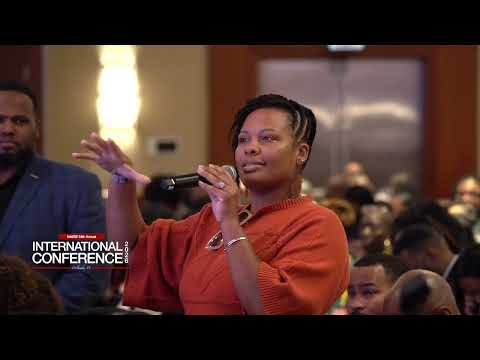
NABSE 2026 Conference Promo Video
🎬
2026 Conference Video
YouTube ▶
2026 Annual International Conference Promo
Official promotional video for the NABSE 2026 Annual International Conference in Orlando, FL. Share on social and in emails to drive conference registration.
▶  Watch on YouTube

📹 More Video Resources

An extensive library of video content including b-roll footage, conference highlights, and the 50th Anniversary tribute from Board Members and Affiliate Leaders is available on the official NABSE YouTube channel.

▶  Visit NABSE YouTube Channel

Also available on YouTube
  • 50th Anniversary Tribute - Board Members & Affiliate Leaders
  • Conference b-roll footage for press & media use
  • NABSE leadership and educational content
💻

Zoom Backgrounds

Official NABSE virtual backgrounds for Zoom, Teams, and Google Meet.

General Branded Background
Official NABSE branded virtual background for all video meetings and public-facing calls.
Branded Background 2
Second NABSE virtual background variation.
Branded Background 3
Third NABSE virtual background variation.
54th Conference - Red
54th Annual International Conference background - red edition.
54th Conference - Dark
54th Annual International Conference background - dark edition.

How to set your Zoom background

  1. Click Download Background above to save the file to your computer
  2. Open Zoom and go to Settings → Background & Effects
  3. Click the + button and choose Add Image
  4. Select your downloaded NABSE background file
  5. Click it to set as your active background - you're all set!
🔤

Typography

Approved typefaces for NABSE digital and print use.

Primary Typeface
Inter
Clean, modern, highly legible across all screen sizes and print applications
Bold 700 - Headlines & Titles
SemiBold 600 - Subheadings
Medium 500 - Labels & UI
Regular 400 - Body Text
Light 300 - Captions
Type Scale
Heading 1
32px · 700 · ls: 0.02em
Heading 2
22px · 600 · ls: 0.02em
Heading 3
17px · 600
Body text - 15–17px, line-height 1.65, color: #64748B on light bg
15–17px · 400 · lh: 1.65
✓ Copied!